> For clean Markdown of any page, append .md to the page URL.
> For a complete documentation index, see https://allianz.ferndocs.com/llms.txt.
> For AI client integration (Claude Code, Cursor, etc.), connect to the MCP server at https://allianz.ferndocs.com/_mcp/server.
# SmartContent
SmartContent delivers priming messages, banner ads, educational content and a second-chance purchase page, styled to match your site. It's a client-side integration that retrieves the content directly from Allianz Partners, so your customers always see current, personalized messaging.
#### Easy to install
Four lines of code.
#### Low maintenance
Update one JS URL to get new content.
#### Purchase ready
Optional quote widget for travel products.
#### Your styles
Follows your CSS, layout and fonts.
#### Mobile friendly
Scales to your viewports.
#### HTML capable
Images, text and custom design elements.
#### Analytics enabled
Page view and event tracking.
#### Compliant
Compliance content managed by Allianz.
## Process
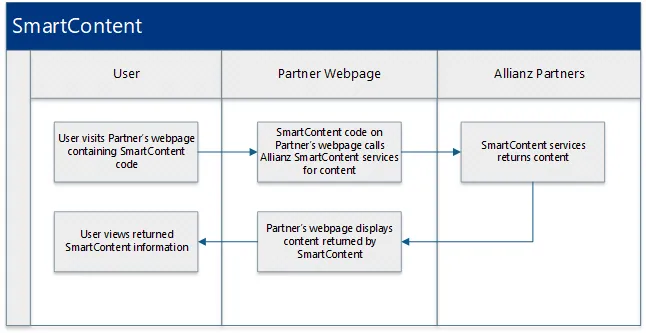
## Add SmartContent to a page
#### Copy the snippet
Paste the Allianz code between the opening and closing `body` tags of the page.
**`Allianz code`**
```html title="Allianz code"
```
#### Check the page
The snippet in context of a full HTML document:
**`example.html`**
```html title="example.html"
Example Code
```
#### Update the content version
When Allianz updates the landing page, it sends a new script URL. The file name (`js-min.js`) stays the same and the version directory changes:
**`Minor update`**
```html title="Minor update"
```
**`Major update`**
```html title="Major update"
```
## Look and feel
SmartContent replicates your fonts and layout styles and follows your site's breakpoints for a responsive design. If anything is misaligned after embedding, adjust it with inline styles.
## Analytics and error tracking
Allianz tracks landing page metrics with Google Analytics: page views over time, and clicks on the content's links.
Errors are logged as Google Analytics events:
* If the landing page HTML can't be loaded, the page shows "We're sorry, but something has gone wrong. Please try again later."
* If the footer's legal content can't be loaded, the page renders normally with default legal content.
## Sample integrations
#### [Content example](https://sandbox.allianzpartnerservices.com/aps-documents/SmartContentExample.html)
SmartContent landing page content.
#### [Content with quote widget](https://sandbox.allianzpartnerservices.com/aps-documents/SmartContentExampleWithQuote.html)
The same content with a travel quote widget.
#### [Integration guide (PDF)](https://sandbox.allianzpartnerservices.com/aps-documents/1smartcontent/Smart-Content-Integration-Guide.pdf)
Smart Content Integration Guide.