
Skip to navigation

SmartContent

Pull Allianz messaging, banners and quote widgets into your site with four lines of code

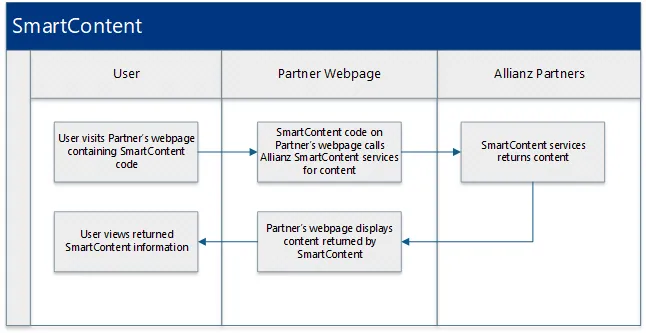
SmartContent delivers priming messages, banner ads, educational content and a second-chance purchase page, styled to match your site. It’s a client-side integration that retrieves the content directly from Allianz Partners, so your customers always see current, personalized messaging.

Easy to install
Four lines of code.
Low maintenance
Update one JS URL to get new content.
Purchase ready
Optional quote widget for travel products.
Your styles
Follows your CSS, layout and fonts.
Mobile friendly
Scales to your viewports.
HTML capable
Images, text and custom design elements.
Analytics enabled
Page view and event tracking.
Compliant
Compliance content managed by Allianz.

Process

SmartContent process flow

Add SmartContent to a page

1

Copy the snippet

Paste the Allianz code between the opening and closing body tags of the page.

Allianz code
<!-- BEGIN: Allianz Code -->
<style>#spinner {width:100%;height:100%;position:absolute;top:5%;background: url('https://azcontent.us/smart-content/shared/loading.gif') no-repeat center #fff;z-index:99999;opacity:1;background-color:white;}</style>
<div id="spinner"></div>
<div class="allianz-external-content" id="allianz-external-content" style="visibility:hidden;"></div>
<script type="text/javascript" src="https://azcontent.us/smart-content/atp-q/js-min.js"></script>
<!-- END: Allianz Code -->
2

Check the page

The snippet in context of a full HTML document:

example.html
<!DOCTYPE html>
<html lang="en-US">
<head>
<meta charset="UTF-8">
<meta name="viewport" content="width=device-width, initial-scale=1">
<title>Example Code</title>
</head>
<body>
<!-- BEGIN: Allianz Code -->
<style>#spinner {width:100%;height:100%;position:absolute;top:5%;background: url('https://azcontent.us/smart-content/shared/loading.gif') no-repeat center #fff;z-index:99999;opacity:1;background-color:white;}</style>
<div id="spinner"></div>
<div class="allianz-external-content" id="allianz-external-content" style="visibility:hidden;"></div>
<script type="text/javascript" src="https://azcontent.us/smart-content/atp-q/js-min.js"></script>
<!-- END: Allianz Code -->
</body>
</html>
3

Update the content version

When Allianz updates the landing page, it sends a new script URL. The file name (js-min.js) stays the same and the version directory changes:

<script type="text/javascript" src="https://azcontent.us/smart-content/pcln/v1-1/js-min.js"></script>

Look and feel

SmartContent replicates your fonts and layout styles and follows your site’s breakpoints for a responsive design. If anything is misaligned after embedding, adjust it with inline styles.

Analytics and error tracking

Allianz tracks landing page metrics with Google Analytics: page views over time, and clicks on the content’s links.

Errors are logged as Google Analytics events:

  • If the landing page HTML can’t be loaded, the page shows “We’re sorry, but something has gone wrong. Please try again later.”
  • If the footer’s legal content can’t be loaded, the page renders normally with default legal content.

Sample integrations